When I came to hear that I can do automation testing for Web, App, and API in just one platform, I feel amazed. After that, I just jumped into learning Katalon. After 30 minutes of learning Katalon, I was talking to myself, “WTH! Why didn’t I found it early.” I was thinking to learn mobile app testing, so I take a project and start learning. I have interacted with some problems which are so common in Katalon forums, but still, the solution is not able to solve my problem. So I was looking for the answer and finally came up with the solutions. So, I thought why not I’m sharing the solution here which might help you guys when you will start learning it. Also, you can found my solution in the comment section of the problem in the Katalon forum. So let’s start-

Problem 1: Can’t able to pass my app’s splash screen at the time of capturing objects!
The problem is you can’t go beyond the splash screen of your app at the time of capturing the objects. Your emulator screen stuck at the splash screen of your app. So the solution is
- First, you need to check your Appium version. Make sure the version is 1.8.1.
- Then, you need to configure some settings. Go to the Project Settings> Desired Capabilities > Mobile > Android, then set the parameter
appWaitPackage: com.mycompany.myapp //your app package name
appWaitActivity: *
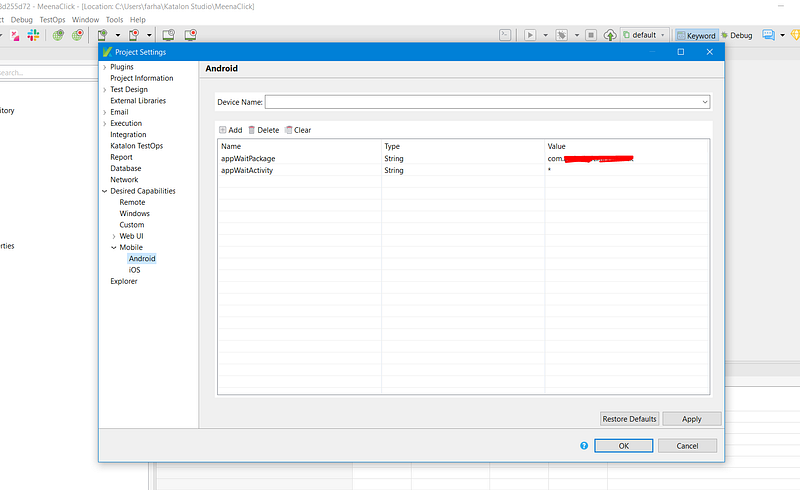
3. Then at the time of performing “Record Mobile”, if your app splash screen gets stuck then just press the capture object button. And, “Woo-Haaa!” the app moves past the splash screen.

Problem 2: Can’t able to press the search button from the keyboard!
First Import
import com.kms.katalon.core.mobile.keyword.internal.MobileDriverFactory as MobileDriverFactory
    import io.appium.java_client.android.AndroidDriver as AndroidDriver
    import org.openqa.selenium.Keys as Keys
    import com.kms.katalon.core.logging.KeywordLogger
    import com.google.common.collect.ImmutableMap as ImmutableMap;
Then called the AndroidDriver
AndroidDriver<?> driver = MobileDriverFactory.getDriver()
Now select that Text field by spying/recording/from captured object class name and send your desired text:
driver.findElement(By.className('android.widget.EditText')).click()
Mobile.delay(3)
driver.getKeyboard().sendKeys("milk")
Now Click on search by writing this command
driver.executeScript("mobile: performEditorAction", ImmutableMap.of("action", "search"));
It’s worked for me.
I will post many more problems that I will face at the time of learning Katalon in this post or in a separate post. Stay Tuned. Bye!
Comments
Post a Comment